
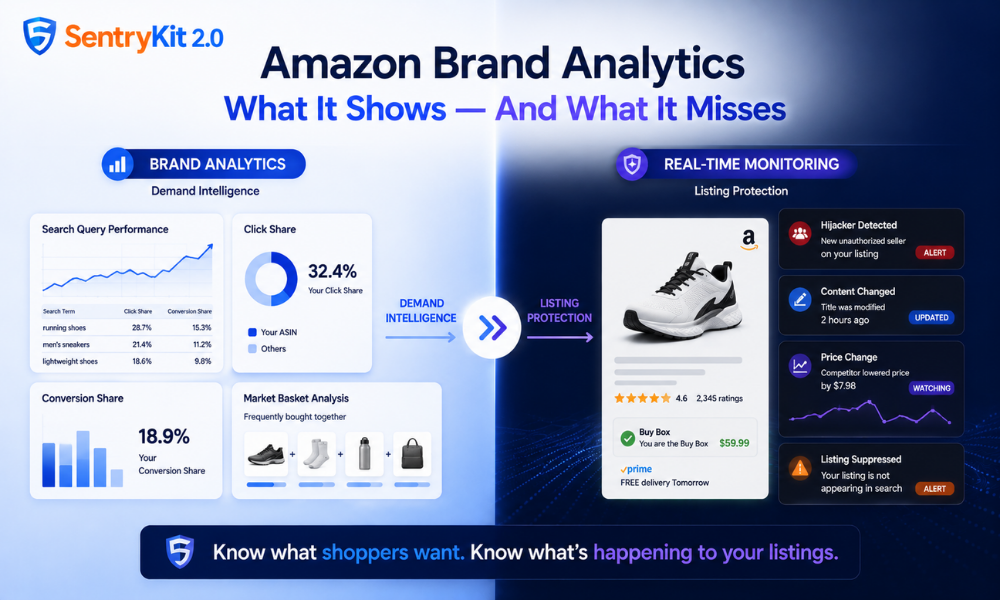
Amazon Brand Analytics is one of the most powerful tools available to Brand Registry sellers. It shows which search terms drive traffic to your ASINs, how your click share compares to competitors, how conversion rates vary by keyword, and how your product appears alongside others in buyers’ market baskets.
What it doesn’t show: whether you’re holding the Buy Box right now, whether an unauthorized seller appeared on your listing this morning, or whether Amazon rewrote your title overnight.
This distinction matters because many sellers treat Brand Analytics as their brand protection dashboard. But Brand Analytics isn’t designed for listing protection. It’s a demand intelligence tool. It answers: what are shoppers searching for, and how does my ASIN perform in that demand landscape? It has no visibility into the supply-side threats that affect your listing in real time.
Search Query Performance shows which keywords send traffic to your ASIN, your click share for those keywords, and your conversion share. Essential data for PPC strategy and organic keyword optimization.
Market Basket Analysis shows which products are frequently purchased alongside yours — useful for bundle strategy, cross-sell targeting, and understanding how buyers navigate your category.
Item Comparison and Alternate Purchase Behavior shows which products buyers viewed before choosing yours, feeding competitive positioning and consideration-stage analysis.
All of this is demand intelligence. It’s excellent at what it does.
Context for why this matters: Marketplace Pulse’s research on Amazon search behavior shows that 78% of keyword searches on Amazon are for generic, non-branded products. That means most of your Brand Analytics keyword data reflects category-level demand — shoppers looking for the product type rather than your brand specifically. Understanding that demand landscape is where Brand Analytics excels.
Brand Analytics has no Buy Box data — not real-time, not historical. It shows your conversion share for a given keyword, but doesn’t tell you whether you held the Buy Box when those conversions happened. A competitor could hold your Buy Box for six hours on a Tuesday — routing every “add to cart” click to their listing — and Brand Analytics would show a dip in conversion share with no indication of why. A Buy Box Loss event is a supply-side threat. Brand Analytics is a demand-side tool.
For a full picture of how Buy Box ownership works — including the factors that determine rotation and what a loss event looks like in your data — see our guide to how the Amazon Buy Box works.
There’s no overlap.Brand Analytics doesn’t monitor who is selling on your listing. The “Other Sellers on Amazon” pool changes in real time and is completely outside Brand Analytics’ scope. When a hijacker appears on your listing, your Brand Analytics dashboard won’t change. If the unauthorized seller wins the Buy Box, your click share might start to drop — but Brand Analytics will report that as a performance change, not a threat signal. You’d see the symptom
The revenue impact of a hijacker win goes beyond the sales you can see. Our breakdown of what a hijacker actually costs — covering direct revenue loss, PPC waste, and ranking risk — shows why the detection window matters more than most sellers realise.
without any indication of the cause.Brand Analytics doesn’t track changes to your listing content — title, bullets, images, A+ content, or attribute fields. Whether Amazon’s AI listing rewrite systems modify your title as part of automated standardization, or a third party manipulates your brand name attribute, Brand Analytics captures none of it. Your listing content as it exists today may differ from what you approved when you submitted it.
A suppressed listing doesn’t appear in Amazon search results. Buyers searching for your product can’t find it. What you’ll see in Brand Analytics when a listing is suppressed: a sudden drop in impressions and click share. What you won’t see: that the listing is suppressed, why it’s suppressed, or what to do about it. The data will look like a traffic problem when the actual cause is a suppression event requiring a specific fix.
Brand Analytics reports are delayed by 72 hours or more for most report types. Search Query Performance data is available on weekly, monthly, and quarterly schedules — not real-time. If a competitor cuts their price by $8 on Monday afternoon, that change won’t appear in your Brand Analytics data until Wednesday at the earliest. By then, you’ve already lost two days of Buy Box share if your price was above theirs.
Real-time price tracking is a core part of competitive defense. Our guide to Amazon MAP monitoring covers how to track competitor prices, set a floor, and protect your Buy Box before it rotates to a seller who undercut you while Brand Analytics was still processing last week’s data.
Brand Analytics answers: “What are shoppers searching for, and how is my ASIN performing in that demand?”
Real-time listing monitoring answers: “What is happening to my listing right now?”
These are different problems requiring different tools. Here’s the split:
| Brand Analytics | Real-time monitoring | |
|---|---|---|
| Keyword traffic and click share | ✓ | — |
| Conversion rate by keyword | ✓ | — |
| Market basket analysis | ✓ | — |
| Buy Box status | — | ✓ |
| Unauthorized seller detection | — | ✓ |
| Listing content changes | — | ✓ |
| Suppression detection | — | ✓ |
| Competitor price changes (real-time) | — | ✓ |
Amazon’s own AI seller assistant, Amelia, has a comparable scope boundary — as we covered in our analysis of Amelia’s blind spots, it answers questions about your Seller Central data but has no visibility into your Buy Box status, unauthorized sellers, or suppressed listings. Amazon’s built-in analytics tools — Brand Analytics, Amelia, and the standard Seller Central dashboard — are all demand-side and data-retrospective. None are designed for real-time supply-side protection.
Use Brand Analytics for: keyword strategy and PPC targeting, competitive click share analysis, understanding what drives or loses conversions, market basket and cross-sell planning.
Use real-time monitoring for: knowing the moment your Buy Box is lost, detecting new unauthorized sellers, catching content changes made by Amazon or third parties, identifying suppression events before they compound, responding to competitor price movements in time to act.
Each of the five gaps above maps to a specific alert in SentryKit: Buy Box Lost, Hijacker Detected, Content Changed, Listing Suppressed, and Competitor Price Change. Brand Analytics tells you what shoppers are searching for. SentryKit tells you what’s happening to your listing right now.
If you’re a Brand Registry seller who uses Brand Analytics regularly but doesn’t have real-time listing visibility alongside it, the 30-day trial is the fastest way to close that gap.
No. Brand Analytics has no Buy Box data — not real-time, not historical. It shows conversion share for keywords but doesn’t indicate whether you held the Buy Box during any given period. Buy Box visibility requires a separate real-time monitoring tool.
No. Brand Analytics doesn’t track who is selling on your listing or changes to the ‘Other Sellers on Amazon’ pool. If an unauthorized seller appears on your ASIN, there’s no direct signal in Brand Analytics — only downstream effects like a drop in conversion share, which appear with a delay and without identifying the cause.
Brand Analytics is a demand intelligence tool — it shows how buyers search for and engage with your ASIN in aggregate. Listing monitoring tracks supply-side events in real time: Buy Box changes, unauthorized sellers, listing content modifications, suppression events, and competitor price movements. Both are useful; they answer different questions.
No. Brand Analytics is excellent for demand intelligence and content strategy but wasn’t designed to detect listing threats, unauthorized sellers, Buy Box losses, or suppression events. Brand protection requires real-time visibility into supply-side listing events — Brand Analytics operates on demand-side data with a reporting delay.
Most Brand Analytics reports update on a weekly, monthly, or quarterly schedule — not in real time. Search Query Performance has the shortest update cycle (weekly). Market Basket Analysis and some other reports update monthly. Competitor pricing data is not tracked in Brand Analytics at all — and even the fastest-updating reports have at minimum a multi-day lag between an event and its appearance in your dashboard.
No. Brand Analytics has no visibility into listing content changes — whether made by Amazon’s AI systems, third parties through the catalog, or Seller Central processing errors. If your title, bullets, or images are modified, Brand Analytics won’t show it. The downstream effect (a drop in click share or conversion rate) may eventually appear in your data, but without identifying the cause or the specific change that triggered it.

Nisha Shetty · Marketing Manager, SentryKit
Nisha is a marketing manager and former Amazon seller who writes about e-commerce growth, consumer behavior, and digital retail trends.