Amazon Product Monitoring

50+ signals on your listings. Each one with the reason attached.

Most tools tell you a status changed. SentryKit tells you why — the reason code Amazon gave for a suppression, which cost component broke your floor price, which seller is sitting on your offer and where they ship from. Real-time Amazon product monitoring across every ASIN and every marketplace you sell in.

No credit card required · Cancel anytime

50+ signals
monitored on every listing,
on every plan
9 groups
from FBA fees and margin
to hijackers and rank
14 days free
full access, no card,
then $19/mo
What an alert actually contains

Not "something changed."
What changed, what it costs, and what to do.

Every signal arrives with the context you would otherwise spend twenty minutes digging for across Seller Central. Pick a scenario.

Alert Scenarios

These are six of 50+. See all nine signal groups ↓

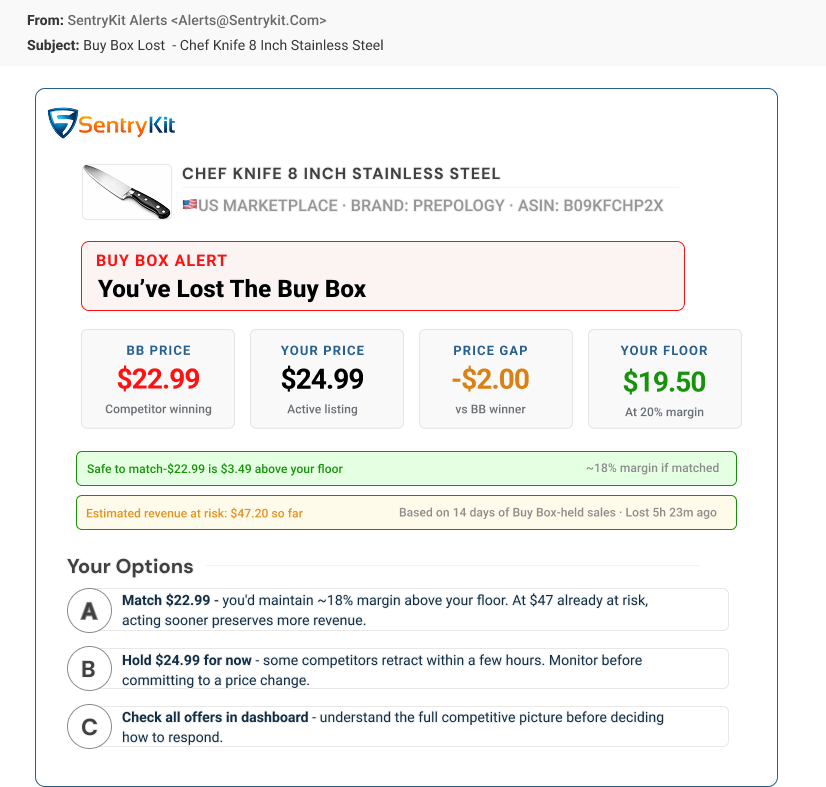
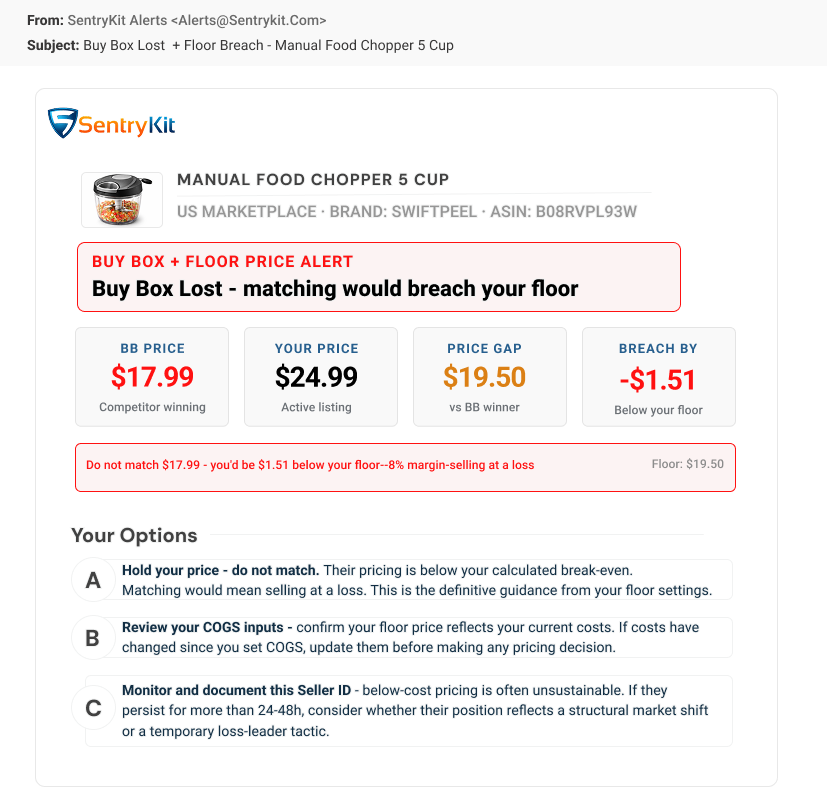
SentryKit Buy Box Lost alert showing the competing seller, the price gap and ranked recovery options
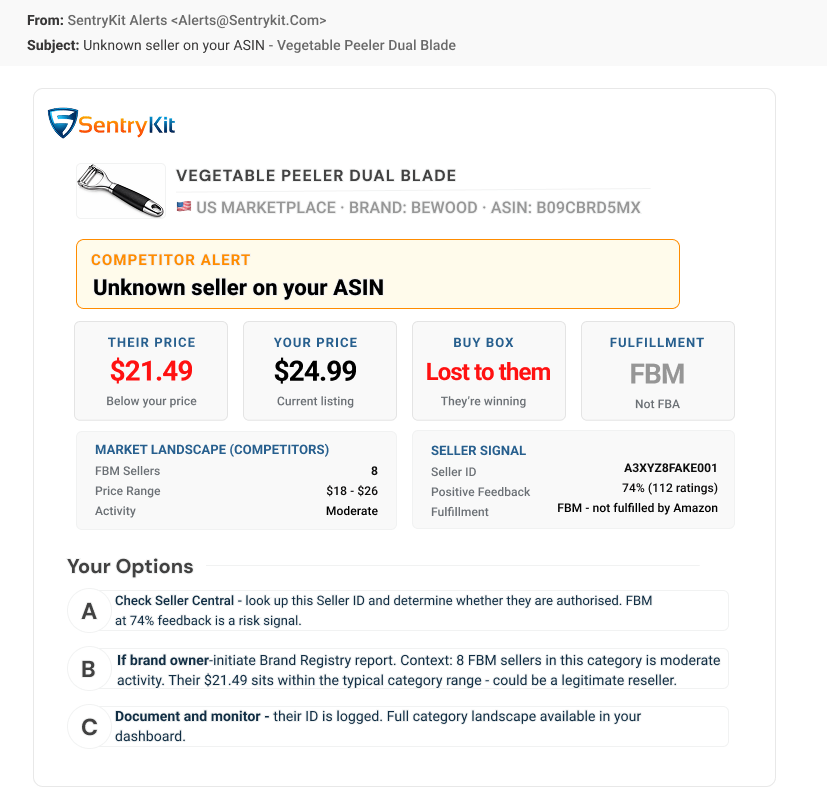
SentryKit hijacker alert showing an unrecognised seller on a branded Amazon listing with their seller profile
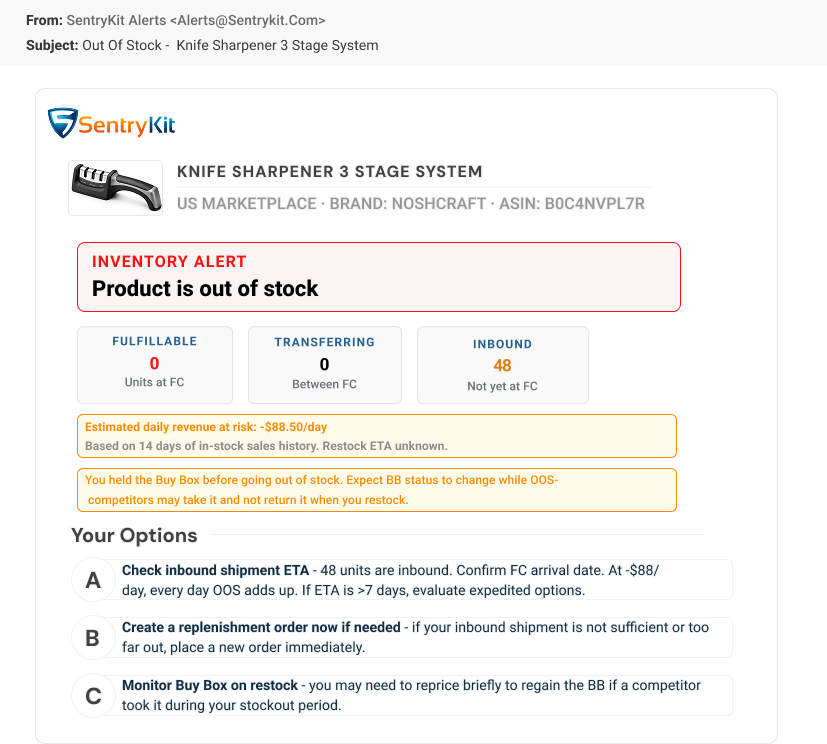
SentryKit out of stock alert showing FBA stock at zero and whether a restock is in transit
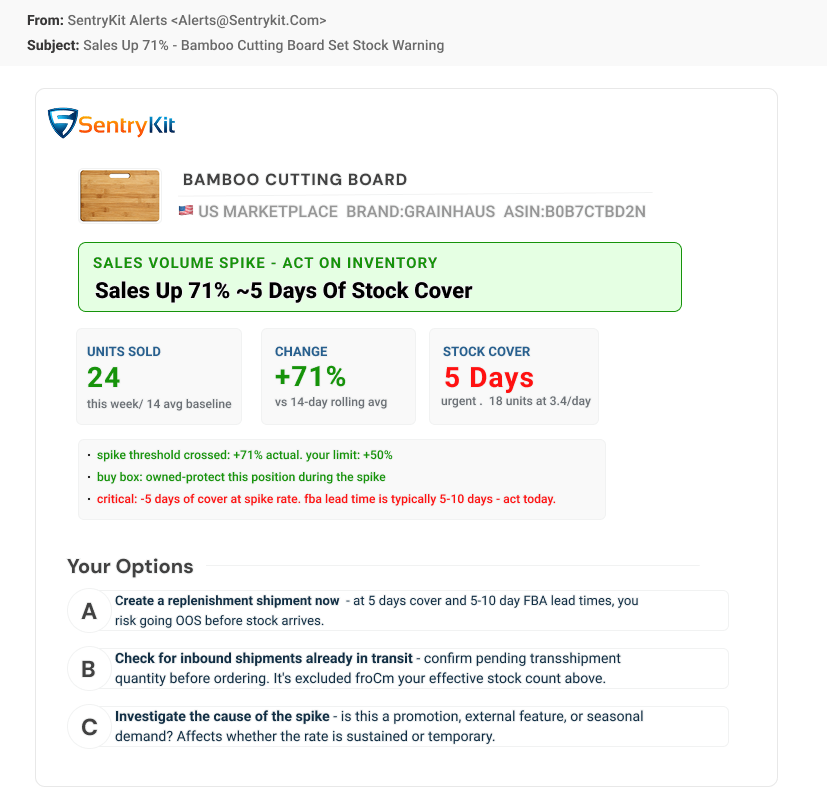
SentryKit sales volume up alert showing a velocity surge and the remaining days of stock cover
SentryKit price floor breach alert showing the landed cost floor and the margin lost per unit
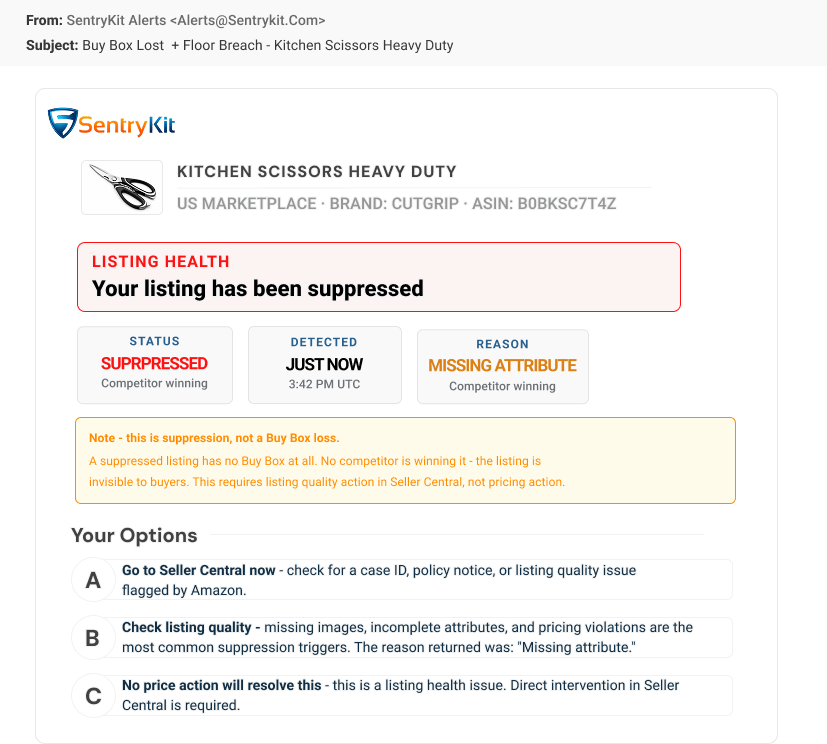
SentryKit Buy Box suppressed alert showing that Amazon removed the Buy Box entirely
Full coverage

Nine groups. 50+ signals.
Every one of them on every plan.

Ordered by what Amazon sellers actually search for — fees and margin first, because that is where the money is. Nothing here is reserved for a higher tier.

Group 1

Fees, margin & profitability

FBA and referral fee changes, margin thresholds crossed, and landed cost moving against your floor price. Fees update automatically from Amazon, so your floor is never stale.

Group 2

Buy Box & pricing

Buy Box lost and regained, no featured offer at all, competitor price moves with the exact delta, and your own price changes. Buy Box Lost and Buy Box Suppressed are kept separate, because the fix is not the same.

Group 3

Account health & policy

Account health rating movement, policy and performance metrics, and the notifications that tend to arrive before an enforcement action does.

Group 4

Listing health & suppression

Search suppression with the reason Amazon gave, including the reason code — not just a suppressed flag. Plus suspended listings and the Add to Cart button disappearing.

Group 5

Product content & backend fields

Title, main image, bullets, category and parent-child changes — plus backend attributes most tools never look at, like generic keywords and country of origin, shown as a before and after.

Group 6

Reviews & feedback

New reviews as they land, movement in your top-rated reviews, and seller feedback trends across the catalogue.

Group 7

Rank & visibility

Best seller rank movement, and the badges that quietly move conversion — Best Seller, Amazon's Choice, and Subscribe & Save eligibility.

Group 8

Inventory & fulfilment

FBA and FBM stock levels, true stock-outs including units still in transshipment, and sales volume swings in both directions that change how long your cover really lasts.

Group 9

Competitors & hijackers

A seller you don't recognise appearing on your branded listing, with their profile: fulfilment type, feedback rating, storefront size, and US-based versus overseas. Repeat offenders are flagged as repeat offenders.

Delivery

Alerts where you already work

Every signal can reach you on the channel you already have open — no dashboard required, and no upgrade to get programmatic access.

Email
Rich alert emails carrying the metric that moved, the reason behind it, and ranked options — readable without opening the dashboard.
Google Sheets
Every alert appends a row — timestamp, ASIN, signal type, and the key metrics. Your running operations log, no export needed.
Slack
Posted straight into the channel your team already watches, so the person who can act sees it without being told.
API & Zapier
The full REST API and outbound webhooks are included on every plan — route any signal into Zapier, Make, or your own endpoint.
Inside the trial

The same signal gets sharper
the longer it runs.

Day one you get the event. By the end of the trial you have a baseline, which is what turns an alert into a decision. All of this lands inside 14 days, before you have paid anything.

Day 1

The event, with its reason

Connect a storefront and signals start arriving on your live catalogue. Each one names the metric that moved and why — the suppression reason code, the competing seller, the cost component that broke your floor.

Day 7

Your normal becomes visible

A week of history is enough to see which ASINs churn constantly and which never move. The noisy ones stop looking like emergencies, and the quiet one that suddenly fires starts meaning something.

Day 14

Repeat patterns named

By the end of the trial the same competitor showing up for the fourth time is flagged as a repeat, not reported as new. You can see which threats are structural and which were one-offs — before you decide whether to pay.

Nothing above requires a card. Every signal and every delivery channel is open for the full 14 days.

Find out what is already happening to your listings

14 days free, no card. Then from $19/mo.

Start 14-day free trial →

Frequently asked questions

50+ signals across nine groups: fees, margin and profitability; Buy Box and pricing; account health and policy; listing health and suppression; product content and backend fields; reviews and feedback; rank and visibility; inventory and fulfilment; and competitors and hijackers. Every group is included on every plan — nothing in the signal set is reserved for a higher tier.

Buy Box Lost means a competitor is now holding your Buy Box — there is a winner and it isn't you. Buy Box Suppressed means Amazon has removed the Buy Box from the listing entirely, so no seller holds it. The cause and the fix are completely different, and no repricer can resolve the second one, which is why SentryKit treats them as separate signals.

Because the status tells you nothing you can act on. Knowing a listing is search-suppressed does not tell you whether the cause is a missing main image, a missing bullet, a restricted claim or a category requirement — and each has a different fix. SentryKit surfaces the reason Amazon itself gives, including the reason code, so the first thing you read is the thing you have to change.

A repricer reacts to a price. It does not tell you who appeared on your listing or anything about them. SentryKit's hijacker signal fires when a seller you don't recognise appears on your branded listing, and includes the seller profile — fulfilment type, feedback rating, storefront size, and whether they are US-based or overseas — which is what you need before deciding on an IP complaint or a cease-and-desist.

Yes. Signals are delivered as events, not as a scheduled report you have to go and read. You can also opt into a portfolio digest that summarises your whole catalogue in one email, on top of the real-time signals rather than instead of them.

Email, Slack, Google Sheets, Zapier, or straight into your own systems through the REST API and outbound webhooks. The API and webhooks are included on every plan at no extra cost, so you can route any signal anywhere without an upgrade or a sales call.

Yes, and neither affects your price. ASINs, orders and marketplaces are unlimited on every plan — monitor 50 ASINs or 50,000 for the same cost. Each ASIN gets its own configuration, so you can set different thresholds per product. The only thing that changes your price is how many Amazon Seller Central accounts, or storefronts, you connect.

You start with 14 days free and no card, with full access to every signal and every delivery channel. After that, plans start at $19/mo for two storefronts. There is no free tier and no signal held back to a higher plan.