
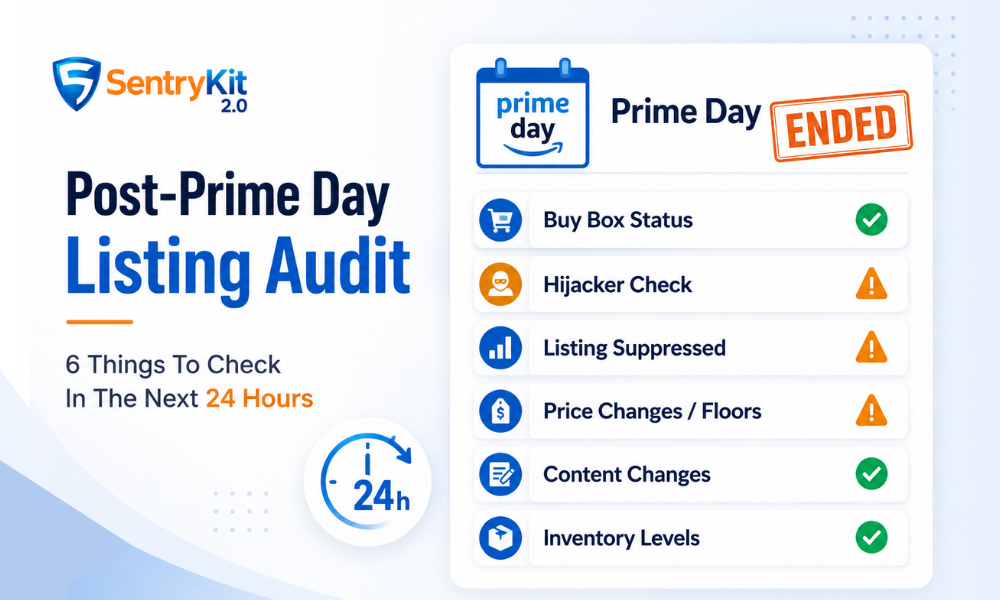
Prime Day 2026 ran June 23–26. Four days of the highest traffic your listings will see all year. Now it’s over — and the next 24 hours are when most sellers make their first mistake: they stop watching.
The window right after Prime Day is when the damage shows up. Hijackers who slipped in during peak traffic. A Buy Box you lost mid-event and never recovered. A listing Amazon quietly suppressed. These aren’t hypotheticals — they’re the most common problems that hit sellers during Prime Day.
This checklist covers six specific things to audit before you close your laptop. It should take under 30 minutes.
Getting ready for October? Prime Big Deal Days 2026 runs October 6–7. Start with what sellers can still fix before Prime Big Deal Days, then run this audit on October 8.
Peak traffic is peak opportunity — for you and for bad actors. Unauthorized sellers time their entry for exactly this kind of window. Traffic is high, margins are compressed, and everyone is moving fast.
A hijacker who enters your listing at 2 AM on day three doesn’t just steal sales during the event — they collect reviews, build seller history, and become harder to remove. The difference between catching a problem in hour one versus day three isn’t just the lost sales. It’s how much cleanup you’re left with.
Run this audit now, while the data is fresh and the fixes are still straightforward.
Pull up every ASIN that had meaningful Prime Day volume and check the offer listing page. You’re looking for sellers you don’t recognize — new entries, unfamiliar storefronts, suspiciously low prices on your branded ASINs.
Unauthorized sellers often list used or counterfeit product as new. According to Amazon’s Brand Protection Report, the company blocked over 700,000 bad-actor accounts last year — but plenty still get through, especially during high-traffic events.
If you find someone you don’t recognize, start documenting immediately: screenshot the offer, note the seller name and price. Amazon provides a step-by-step process for reporting an unauthorized seller through Seller Central. Then follow the process for how to remove a hijacker once you’ve confirmed they’re there.
Buy Box status changes faster than most sellers realize. A competitor can enter your listing, undercut your price, and take the Buy Box in under ten minutes. If you were running Prime Day deals, your pricing was already moving — which makes Buy Box shifts easy to miss in the noise.
Check your top ASINs. Look at the current Buy Box winner, their price, and their fulfillment method. If you lost it and haven’t recovered, that’s active revenue leakage right now — not a post-event cleanup item.
One distinction worth knowing: Buy Box Lost means a competitor holds it. Listing Suppressed means Amazon removed the Buy Box entirely. These require different fixes. Don’t conflate them.
A suppressed listing has no Add to Cart button. Customers can find the product page but cannot buy. Amazon suppresses listings for pricing policy violations, content issues, and compliance flags — and the timing often correlates with high-activity periods when their systems are running hot.
Check your Active Listings report in Seller Central and filter for any status changes from June 23–26. If something was suppressed mid-event, you lost every sale from that window. Start with diagnosing a suppressed listing before making any changes.
High-competition windows push prices down hard. If you have pricing rules or repricer logic running, check whether any ASINs hit prices you didn’t intend during the event — or went below your floor, if one wasn’t set correctly.
A well-defined price floor protects your margin when competition is aggressive. If Prime Day exposed a gap in your floor logic, close it before the next high-traffic window.
Amazon occasionally updates listing content based on customer-contributed data, A+ contributions, or catalog merges. During high-traffic events, these changes land more often.
There’s also a reported (not yet confirmed as official policy) mechanism called Project Starfish, through which Amazon can modify listing content without seller notification. Whether or not it surfaces during Prime Day specifically, content changes happen — and you want to catch them now, not three weeks from now when your conversion rate has quietly dropped.
Check your title, main image, bullet points, and A+ content on your top ASINs. If anything changed, flag it and submit a case.
Going out of stock during Prime Day has a tail effect. Amazon’s ranking algorithm factors availability into organic placement — ASINs that went OOS mid-event often see ranking suppression that lasts days after inventory is restored.
Check your Inventory Health report and cross-reference with your Prime Day sales data. Any ASIN that hit zero during June 23–26 should be on your priority restock list. Expect a rankings recovery period of several days, not hours.
Hijacker found: Document, report through Brand Registry, and follow up with Amazon Seller Support. Speed matters — the sooner you file, the sooner enforcement can act.
Buy Box lost: Check whether your price, fulfillment method, or account health metrics changed during the event. A Buy Box you held before Prime Day should be recoverable once you’ve addressed the competitive gap.
Listing suppressed: Pull the suppression reason from Seller Central, correct the flagged issue, and relist. Don’t modify anything else until you’ve confirmed the suppression reason — guessing and editing can delay reinstatement.
Content changed: Open a case with Seller Central and include before/after screenshots. Brand-registered sellers have more standing here — use it.
This checklist works. It also takes 30 minutes of manual effort — after you’ve already spent four days managing an event.
SentryKit runs in the background during events like Prime Day and logs what happens to your listings as it happens: Hijacker Detected, Buy Box Lost, Listing Suppressed, Out of Stock. Every alert is timestamped and stored in your alert history. Content Changed alerts are delivered as a daily digest so you have a clear record without noise.
After Prime Day ends, you open your dashboard and see a complete record of what happened — when, on which ASIN, and in what order. The audit that takes 30 minutes manually takes five minutes with the log in front of you.
SentryKit is a Buy Box intelligence platform built for brand-registered sellers. All plans include real-time alerts, starting at $19/month.
See what happened to your listings during Prime Day — start a free trial.
There’s no fixed deadline, but the sooner you act, the better. Hijackers who stay on your listing accumulate sales history, reviews, and sometimes seller feedback — all of which make removal harder over time. File your report through Brand Registry as soon as you identify an unauthorized seller. Most cases are reviewed within 2–5 business days, but enforcement speed varies.
Not permanently — but they can hold it for as long as they remain price-competitive and maintain good account metrics. If you lost the Buy Box during Prime Day and haven’t recovered it, the competitor is likely still undercutting your price or has a fulfillment advantage. Review your pricing and fulfillment setup against theirs, then adjust. The Buy Box isn’t locked to anyone indefinitely.
Amazon does not always send a direct notification for suppressions, and during high-traffic events the notification delay can be significant. You may receive a performance alert in Seller Central, but many sellers discover suppressions only when they notice a drop in orders or check their Active Listings report manually. Running a post-event audit — or using a tool that logs suppression alerts — is the only reliable way to catch these quickly.
If you’re doing it manually, expect 20–30 minutes for a catalog with 10–20 active ASINs. The hijacker scan and content check tend to take the longest because they require opening each ASIN individually. If you have monitoring tools running, you’re reviewing a log rather than building one from scratch — that drops the time to under 10 minutes. Either way, run it within 24 hours of Prime Day ending, while the data is still fresh.
They’re often the same thing, but the terms mean slightly different things. A hijacker specifically refers to a seller who lists on your branded ASIN without authorization — often selling counterfeit, used, or gray-market product as new. An unauthorized third-party seller is a broader term: it includes hijackers but also covers legitimate resellers who are selling genuine product without a distribution agreement. Hijackers are the more urgent problem because they’re typically misrepresenting the product. Both need to be addressed, but through different channels — hijackers through Brand Registry, unauthorized resellers through cease-and-desist or channel enforcement.
Not automatically. Prime Day pricing is promotional pricing — buyers expect deals during the event, not after it. Dropping your price post-event doesn’t recover lost Prime Day sales; it just compresses your margin going forward. What you should do is check whether your Buy Box was lost because of a price gap, and if so, close that specific gap — not across the board. If you’re holding the Buy Box at your current price, leave it. Reactive price cuts after Prime Day are one of the most common ways sellers give back the margin they just earned.

Nisha Shetty · Marketing Manager, SentryKit
Nisha is a marketing manager and former Amazon seller who writes about e-commerce growth, consumer behavior, and digital retail trends.