
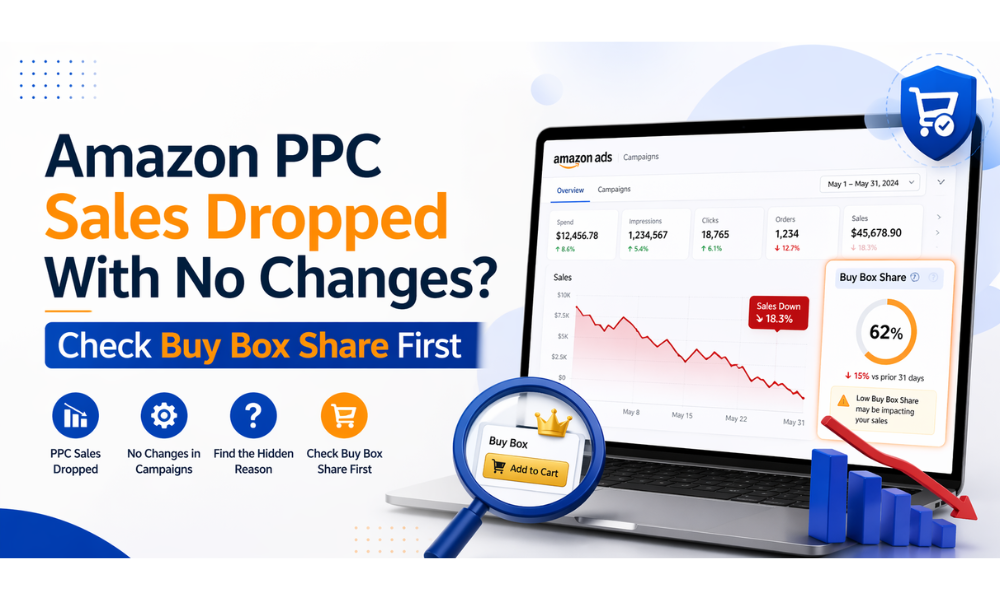
Your Sponsored Products campaigns are running. You haven’t touched a bid. You haven’t paused a keyword. Yesterday you did $3,400 in PPC-attributed sales. Today it’s $180 and your impression graph is bleeding out.
The first instinct is to rip open campaign manager and start adjusting bids. Don’t. In my experience, nine times out of ten this isn’t a PPC problem — it’s a Buy Box share problem. Your ads did what they always do. Your listing lost the Featured Offer slot, and Amazon stopped serving your ads because it couldn’t.
This post walks through the four-minute diagnostic you should run before touching a single campaign. If the data points somewhere else, then by all means optimize bids. But most sellers skip this step and spend a week tuning the wrong lever.
A thread on r/AmazonFBA this month had 30 comments from sellers watching traffic, CTR, and conversion all crash on the same day with zero campaign changes on their side. The replies were a parade of bid-adjustment advice. Nobody asked the obvious question first: did the listings lose the Buy Box?
Here’s why that question matters. Sponsored Products ads only trigger when your offer holds the Featured Offer slot — what sellers still call the Buy Box. If a competitor takes the Buy Box on your ASIN, Amazon stops serving your ads on that listing. Not reduces — stops. The campaign keeps running, the budget sits untouched, but the placements report quietly empties out.
You won’t see a warning. You’ll see the numbers you’re seeing right now: traffic vanished, CTR unchanged (because the tiny trickle of impressions that still show has normal click rates), conversion destroyed (because even the clicks that come through route to a competitor’s offer).
That’s the signature. When all three metrics collapse together with no campaign-side explanation, the cause is almost always upstream of your PPC setup.
Amazon’s own Sponsored Products eligibility rules are explicit: your offer has to be the Featured Offer to run ads. If you don’t hold the Buy Box, your Sponsored Products ads don’t serve on that listing at all.
That rule sounds obvious until you realize what it means for your diagnostics. Every PPC metric you look at is downstream of that gate. Impression share, CTR, spend velocity, ACOS — all of it assumes you’re eligible to serve. The moment you’re not, those numbers go to zero in a pattern that looks identical to “my campaigns broke.”
There’s a second layer. Amazon also runs what’s sometimes called a “suppressed Featured Offer” state — your price is technically competitive but Amazon’s internal pricing deviation check decides no seller deserves the slot right now. The listing keeps its reviews, its ranking, its content. No offer wins. No one’s ads serve. Sellers who don’t know this state exists chase ghosts for weeks.
This is the difference between Buy Box Lost (a competitor holds it) and Buy Box Suppressed (no one holds it). The distinction changes the fix completely. I’ve written about this in detail in our Buy Box issues recovery guide — worth a separate read if you’re not sure which one you’re facing.
Before you open campaign manager, run this. You don’t need a paid tool — Seller Central has everything.
Business Reports → Detail Page Sales and Traffic by Child Item. Filter to the last 30 days. The column you want is “Featured Offer (Buy Box) Percentage.”
You’re looking for one pattern: does Buy Box % step down sharply on or one day before the PPC drop? If yes — found it. If Buy Box % is holding at 95%+ through the drop, this isn’t the issue and you can rule it out.
A Buy Box % that drops from 92% to 8% overnight is the most common shape of this failure mode. You don’t need sophisticated analysis — the visual is obvious.
Campaign Manager → Reports → Sponsored Products → Placement. Filter to the affected campaign window.
If Buy Box loss is the cause, you’ll see impressions drop to near zero on “Top of Search” and “Rest of Search” simultaneously on the same date. If only one placement type dropped, it’s more likely a campaign-side or keyword-side issue.
Open the product page in an incognito window (logged out). Scroll to “Other sellers on Amazon” or click through to the offers page.
You’re looking for: a new seller at a lower price, an FBA offer from someone who wasn’t there last week, or Amazon itself showing up as a seller. Any of these can take the Featured Offer slot from you. If you see an unauthorized seller, that’s a hijacker — handle it using the hijacker removal playbook before anything else.
Seller Central → Inventory → Manage All Inventory → find the SKU → check “Buy Box Eligible” status. If it’s “No,” you’ve got a listing-level eligibility issue — account health, order defects, late shipment rate, or a content trigger. The listing health issues guide covers the specific triggers.
If eligibility says “Yes” but Buy Box % is still in the dirt, the issue is price competitiveness or Amazon’s deviation flag (we’ll come back to this).
Total time on this diagnostic: about four minutes per ASIN. It’s the cheapest check in Amazon operations and it’s the one sellers skip most often.
After running this a few hundred times on different accounts, the patterns cluster into five scenarios:
1. New competitor arrived with a lower price. By far the most common. Someone undercut you by $0.50–$4.00 and Amazon handed them the Featured Offer. Your PPC went dark the same day. Fix: match the price or hold and wait for them to run out of inventory. If it’s a wholesale category, pricing discipline matters — I cover this in the margin guide.
2. Hijacker on the listing. An unauthorized seller takes the Buy Box with a counterfeit or grey-market offer. Traffic from your ads routes to them.
3. Stockout in one fulfillment channel. You’re still “in stock” in aggregate but FBA ran out. Buy Box routes to your FBM offer, which Amazon weights differently. Or to a competitor who has FBA. I’ve seen this break PPC on accounts that had inventory alerts set up poorly — the stockout is detected hours after it already cost you the Buy Box.
4. Listing got suppressed. Content change, image violation, variation split — Buy Box removed entirely. No competitor holds it. See how stockouts and suppressions destroy rankings for the downstream damage.
5. Amazon’s price deviation flag fired. Your price is fine but Amazon’s scraper decided an external price is lower and suppressed the Buy Box across all sellers. This one’s the nastiest — it looks like nothing on your end changed because nothing did. The fix is a Managed Account escalation, not a bid change.
Four out of five of these scenarios have nothing to do with PPC. One of them — price undercutting — interacts with PPC indirectly but still can’t be solved by adjusting bids.
There’s a real set of cases where the problem is in your campaigns. The telltale signs are different:
If the symptoms match these, go optimize. The bid adjustments will actually move the needle. I’d also cross-reference Amazon’s 2026 algorithm signals — some PPC “drops” are the organic ranking graph moving underneath you, which PPC can partially compensate for but not fix.
The diagnostic above only helps if you run it within 24 hours of the drop. Past that, you’ve burned PPC budget on missing impressions and lost organic rank along with Buy Box share.
Four things help:
Monitor Buy Box percentage daily, not weekly. Seller Central’s default view is 30-day rollup. The drop that killed your PPC happened on one specific day. Pull the daily view at least once every two days. If you have more than 50 ASINs, automate it — manual checking doesn’t scale past about 80 SKUs.
Treat competitor price changes as a leading indicator. Most Buy Box losses happen within 10 minutes of a competitor price change. If you see a new competitor drop their price on one of your listings, your Buy Box is usually gone before the Sponsored Products placements report catches up. According to Marketplace Pulse data on Buy Box dynamics, the shuffle can happen multiple times per hour on competitive ASINs — dashboards reporting on a 24-hour lag will always be behind the actual event.
Know what triggers a Buy Box loss even when your price is fine. Not every loss is caused by undercutting. There’s a set of price-independent triggers — account health dips, variation pickup by a new seller, FBA/FBM channel mix shifts — that I walk through in Buy Box Loss Without Price Drops. If your price didn’t change and there’s no obvious new competitor, start there.
Don’t confuse listing suppression with Buy Box loss. Different fix, different revenue math. A suppressed listing has no Featured Offer at all. A lost one has a competitor’s. Sellers consistently miscalculate revenue at risk by lumping them together.
SentryKit’s Buy Box Lost and Hijacker Detected alerts fire within about 90 seconds of the change — well before PPC dashboards catch up. That said, the diagnostic above works without any tool. The point of this post isn’t to sell you software. It’s to save you a week of bid-optimizing a PPC system that was doing exactly what it was designed to do.
One soft note on repricers: if your drop coincides with a repricer making a price move you didn’t expect, that’s worth auditing separately. A repricer going rogue is a different failure pattern — relevant when it happens, not the topic here. (For readers comparing approaches, see our BQool alternative breakdown and the Amazon tools for agencies page for accounts managing multiple sellers at once.)
For sellers who want a broader picture of what’s actively monitoring in 2026, our best Amazon monitoring tools roundup and best Amazon FBA alert tools guide cover the category beyond our own tool. If you’re already seeing weird sales patterns, the hidden causes of sudden sales drops post pairs well with this one.
The next time a campaign “stops working” with no explanation, spend four minutes in the Buy Box diagnostic before touching a bid. Most of the time you’ll find the cause lives upstream of PPC entirely — and the fix is different from what campaign manager will let you do.
You can’t fix what you can’t see, and the thing you can’t see most often isn’t the bid. It’s the Buy Box.
No. Sponsored Products ads only serve on listings where your offer is the Featured Offer (the Buy Box). If you lose the Buy Box, your ads on that ASIN stop serving immediately. The campaign keeps running and the budget stays, but impressions go to zero on that listing until you hold the Buy Box again.
In Seller Central, go to Reports → Business Reports → Detail Page Sales and Traffic by Child Item. Filter to the last 30 days and look at the “Featured Offer (Buy Box) Percentage” column. For a daily breakdown, set the date range to one day at a time or pull the report as a daily export.
Buy Box Lost means a competitor currently holds the Buy Box on your listing — your offer still exists, but theirs is the default Add-to-Cart. Buy Box Suppressed means no one holds the Buy Box; Amazon has removed the Featured Offer slot entirely, usually because of a listing condition issue or a price deviation flag. The fix is different, and revenue at risk should be calculated differently for each case.
Because CTR is a ratio of clicks to impressions. If you lose the Buy Box, impressions go to near-zero but the tiny trickle that still comes through clicks at a normal rate. Low impressions plus normal CTR plus crashed conversion is the signature of a Buy Box-caused PPC drop, not a PPC-caused one.
Yes. Amazon runs an internal price competitiveness check that compares your listing against external retailers. If its scraper finds a lower price on an external site — even an inaccurate one — it can suppress the Buy Box across all sellers on the listing until the discrepancy clears. The escalation path is through a Managed Account rep, not standard Seller Support.
If you’re running Sponsored Products, you want to know within minutes, not hours. Most Seller Central dashboards update on a 1–24 hour lag. By the time the dashboard shows the loss, you’ve already burned half a day of PPC budget on ads that didn’t serve plus lost a day of organic sales. Real-time alerts close that gap.

Nisha Shetty · Marketing Manager, SentryKit
Nisha is a marketing manager and former Amazon seller who writes about e-commerce growth, consumer behavior, and digital retail trends.