
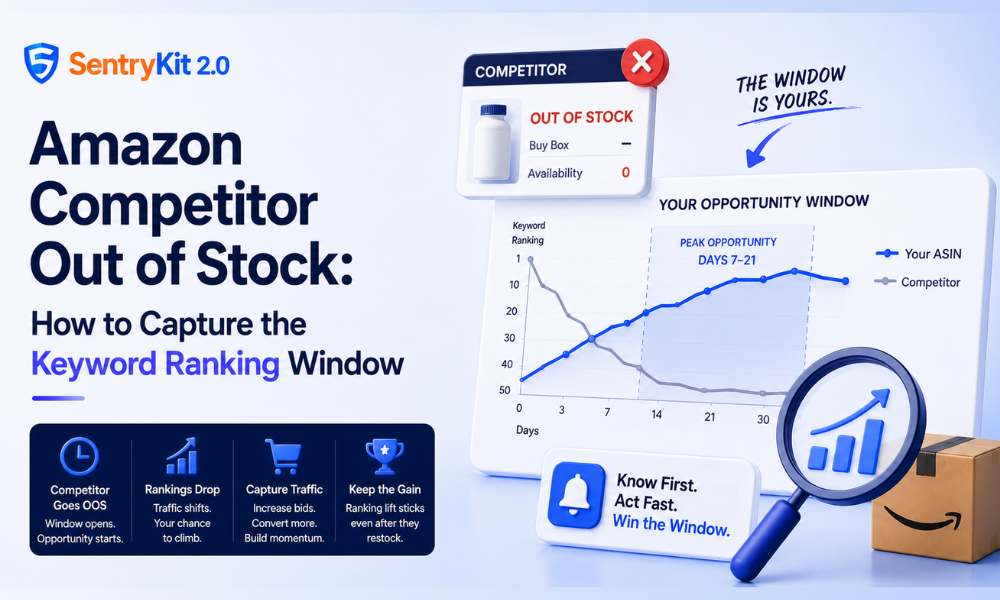
When a top competitor goes out of stock, most sellers don’t notice until it’s over. By the time the data surfaces, the competitor has already restocked. The window — the brief period where their keyword rankings soften and their Buy Box share disappears — has already closed.
That window is real. And it’s worth capturing. The question is whether you find out in time to do anything about it.
Amazon’s algorithm factors in sales velocity when ranking products. When a competitor’s ASIN goes out of stock, their unit sales drop to zero. If they stay OOS for more than a few days, Amazon pulls back their organic position — because a product that can’t be purchased can’t serve the search query.
That’s your opening.
While their ranking softens, your ASIN has a chance to climb. More impressions, better ad positioning (their sponsored placements thin out too), and a buyer pool that has to make a different choice. I’ve watched this play out most clearly in categories with 3–5 dominant competitors — supplements, kitchen accessories, pet supplies. When one of those top players goes OOS, the traffic doesn’t disappear. It redistributes.
A seller who monitors their competitors and moves within 24 hours can capture organic ranking gains that stick even after the competitor restocks — because the algorithm uses your accumulated sales velocity to reassess your position. The window isn’t just a short-term traffic bump. Done right, it’s a ranking reset in your favor. You can monitor which ASINs to watch most closely by tracking their Buy Box position alongside inventory status.
The window varies by category and how strong the competitor’s historical velocity was. The typical pattern:
Days 0–3: Competitor goes OOS. Their ranking hasn’t moved significantly yet — Amazon is slow to demote listings with strong historical performance. You see an opportunity but the algorithm hasn’t reacted.
Days 4–10: Organic ranking starts to drop. Sponsored Placement share thins. Buyers are choosing alternatives. This is when the opportunity is real and visible.
Days 7–21: Peak window. If you’ve been running hard on bids and your listing is healthy, this is where the ranking lift shows up in your data. Your conversion rate on the category’s top terms will be at its highest relative to theirs.
Days 14–30+: Competitor restocks. Their ranking begins to recover — typically faster than it fell, because their historical velocity gives them a head start with the algorithm.
The sellers who benefit aren’t the ones who notice the competitor went OOS. They’re the ones who know it immediately. Finding out on day 12 means you’ve missed the first week of the window. You’re working the tail of an opportunity that’s already closing.
You have roughly 24 hours before the category starts adjusting and other sellers notice the shift. Here’s the move:
Check your own inventory first. If you’re going to spike your bids and capture volume, you need enough FBA stock to handle it. Running hard on bids while at low inventory is how you go OOS yourself and hand the window back.
Increase bids on the competitor’s brand terms and top category keywords. Their sponsored placements are thinning. Your bids go further right now. Target exact-match terms where they were dominant, and expand to phrase matches that would have been theirs.
Check your listing copy against the keywords they ranked for. If they held strong positions on specific long-tail terms, make sure your listing supports those queries. You’re positioning to catch traffic that’s looking for an alternative — not copying their listing.
Watch your conversion rate. A surge of OOS-driven traffic doesn’t automatically convert at your baseline rate. Some of those buyers specifically want the competitor’s product and may not convert. If CVR drops meaningfully, pull back on bids before you burn budget into bad ACoS.
Track how long they stay OOS. Three days OOS is noise. Three weeks OOS is a category shift. Most sellers don’t have a system for tracking competitor restock timing — they find out the window closed when their own numbers drop back.
This whole playbook collapses if the signal arrives late.
Most sellers find out a competitor went OOS one of two ways: they happen to browse the category listing page, or a weekly report flags a ranking change after the fact. By then, the window is open and closing. You’re reacting to history, not an opportunity.
SentryKit’s Out of Stock alert fires the moment a monitored competitor’s ASIN goes unavailable — before any pricing report, before any dashboard refresh, before the algorithm has had time to react. The difference between knowing a competitor went OOS last Tuesday and knowing they went OOS 90 minutes ago is the difference between getting the full window and missing it. You can see exactly what the Out of Stock alert catches and when.
If you’re in a category with 3–5 serious competitors, set up monitoring on each of their top ASINs now. The next time one of them goes OOS, you’ll have the full window — not the last half of it.
Start a free 30-day SentryKit trial and get real-time Out of Stock alerts on your top competitors.
It varies by category and the competitor’s historical velocity. Most windows run 7–21 days. Competitors with strong historical sales velocity recover their organic ranking faster than they lost it, so the effective opportunity window is usually shorter than the time they’re actually OOS.
Not automatically — you have to act on the opportunity. If you increase PPC bids and generate more sales volume during the competitor’s OOS period, the algorithm uses that velocity to reassess your organic position. The ranking lift comes from your own sales data, not from their absence alone.
Check your own FBA inventory before anything else. If you don’t have enough stock to handle increased volume, spiking your bids will only drive you OOS next. Once you’ve confirmed you have coverage, increase bids on the competitor’s top brand and category terms.
Yes. You can add monitoring for as many competitor ASINs as you want. For a category with 3–5 main competitors, tracking their top 2–3 ASINs each gives you broad coverage of the windows that matter most.
Only if you don’t monitor CVR closely. The traffic pattern during a competitor’s OOS period can include buyers who specifically wanted that competitor’s product and may not convert on yours. Watch your conversion rate in real time — if it drops significantly, pull back bids before the increased spend damages your ACoS.

Raghav Tiwari · Co-founder, SentryKit
Raghav is the co-founder of SentryKit. He writes about Amazon seller strategy, Buy Box intelligence, and the systems that protect brands on the marketplace.