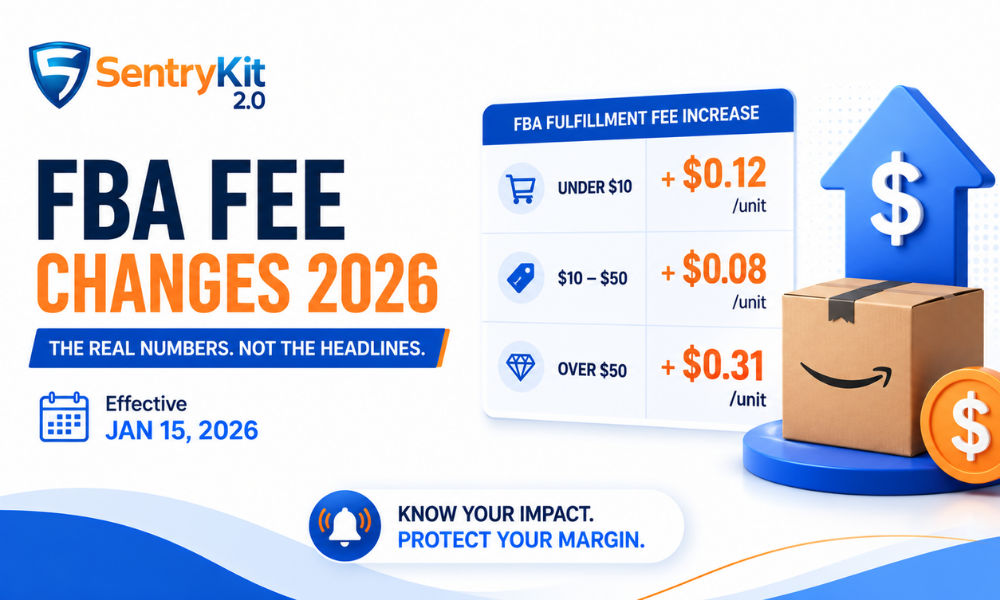
When Amazon announced the 2026 FBA fee changes effective January 15, the headline that spread across seller forums, newsletters, and agency updates was simple: +$0.08 per unit. Clean, easy to act on, easy to reprice around. The problem is that it’s only true for one slice of your catalog — and for many sellers, it’s the wrong slice to be optimising around.
The actual fee structure is tiered by product selling price. Products under $10 saw a +$0.12/unit increase. Products priced between $10 and $50 saw +$0.08/unit — the figure that became shorthand for the entire change. Products priced above $50 saw +$0.31/unit. That last number got very little coverage, and it’s the one that matters most for sellers with high-value SKUs.
If you repriced your entire catalog by adding $0.08 per unit, you may be absorbing $0.23 of unrecovered cost on every high-ticket product you sell, while slightly over-recovering on your cheapest items. This post breaks down the actual structure, covers two additional fee changes that got even less attention, and gives you a step-by-step method for calculating your real impact by tier.
The +$0.08 figure is real. It just applies only to products in the $10–$50 price range. Because the majority of FBA products by unit volume fall in this band, it became the de facto average — and most coverage treated it as a universal number rather than one tier of three.
The error compounded when sellers used that figure to guide repricing. A flat +$0.08 adjustment across an entire catalog makes sense only if every product you sell falls between $10 and $50. If you have products below $10 or above $50 — and most multi-SKU sellers do — the adjustment is wrong at both ends.
For sub-$10 products, the actual increase is +$0.12. The dollar difference is small (four cents per unit), but on high-volume, low-margin items it adds up, and sellers who added $0.08 are leaving margin on the table. For products above $50, the gap is much more significant: the actual increase is +$0.31, meaning a seller who adjusted by $0.08 is absorbing $0.23 per unit out of pocket on every sale of that product. On a product that moves 500 units per month, that’s $115 in unrecovered cost monthly per ASIN.
The broader issue is that most coverage cited a single number because a single number is easier to communicate. Amazon’s official fee schedule is published in Seller Central and breaks down each tier clearly, but reading it takes more time than reading a newsletter summary — so most sellers didn’t. Sellers who read quickly and acted immediately may have set a repricing floor that underserves them on their most valuable products.
There’s also a category dimension the headlines skipped. Certain categories carry additional surcharges on top of the tiered increase. Apparel and footwear have historically carried a separate handling surcharge. Products in the dangerous goods program (such as items containing lithium batteries) may see additional fees applied at the FNSKU level regardless of price tier. The headline figure never accounted for any of these overlaps. If your catalog spans multiple categories, you need to check each fee tier against the category-specific schedule, not just the price-band table.
Finally, the “average increase” framing obscures mix effects. A seller with 80% of revenue in sub-$10 accessories and 20% in high-ticket bundles has a very different blended fee impact than a seller with the opposite split. Aggregating to a single number and then repricing uniformly treats both sellers the same — and that’s where margin leaks quietly.
Here is the actual structure as of January 15, 2026:
| Product Selling Price | FBA Fulfillment Fee Increase | Notes |
|---|---|---|
| Under $10 | +$0.12/unit | Proportionally the largest hit on low-price items |
| $10–$50 | +$0.08/unit | The “headline” figure — applies to most products by volume |
| Over $50 | +$0.31/unit | Often the most undercounted; highest absolute impact per unit |
The tiering reflects Amazon’s approach to recouping storage and handling costs proportionally. Higher-value items tend to be larger, heavier, or require more careful handling — and the fee structure aims to recover those costs at a rate that scales with item value rather than applying a single number across all categories.
Worked example: Say you have three SKUs — a $8 accessory, a $25 household item, and a $65 home goods product. Here’s what the actual fee increase looks like for each:
| SKU | Price | Actual Fee Increase | If You Repriced +$0.08 | Gap per Unit |
|---|---|---|---|---|
| SKU A | $8 | +$0.12 | +$0.08 | -$0.04 per unit |
| SKU B | $25 | +$0.08 | +$0.08 | Correct |
| SKU C | $65 | +$0.31 | +$0.08 | -$0.23 per unit |
In this scenario, only SKU B was repriced correctly. SKU A is absorbing four cents per unit — manageable at low volume, but worth fixing. SKU C is absorbing $0.23 per unit on every sale, which at 200 units per month is $46 in unrecovered fees. At 500 units, it’s $115. This is why the over-$50 tier deserves the most attention in your audit.
Dimensional weight and size tier interactions. The price-band tiers above describe changes to the base fulfillment fee, but the base fee itself is partly determined by dimensional weight. Amazon calculates the greater of actual weight and dimensional weight (length × width × height ÷ 139) and charges the fulfillment fee accordingly. A 1 lb product in a compact box is charged on actual weight. A 1 lb product in a large box may be charged on a higher dimensional weight, pushing it into a higher size tier — which then carries a higher base fee before the 2026 increase even applies.
This means two products at the same price and actual weight can land in different fee tiers purely because of packaging dimensions. If you sell bundled products or items in retail-optimised (but physically large) packaging, your dimensional weight may be higher than you expect. Check it in the Seller Central Fee Preview tool before assuming your product falls in the standard-size fee category.
What changed from 2025 to 2026. The 2025 fee schedule had fewer price-band distinctions. The expansion of the over-$50 tier increase to +$0.31 — up from a smaller differential in 2025 — is the most significant structural change. Amazon also extended the Small and Bulky size category in 2026, shifting some products that were previously classified differently into tiers with higher per-unit handling costs. Category-specific exceptions (like the apparel surcharge and the dangerous goods handling fee) were carried forward unchanged from 2025. If you’re auditing year-over-year margin compression, these structural tier changes, not just the price-band increase, need to be part of the analysis.
Two additional fee changes came into effect alongside the fulfillment rate adjustments and received considerably less coverage. Both can hit your margin without appearing in the headline number.
SIPP — Ships in Product Packaging — is a program that allows Amazon to ship your product in its own packaging rather than adding a poly bag or box. To qualify, your packaging must pass Amazon’s certification as ready-to-ship. If it doesn’t, Amazon now adds a SIPP handling fee for the additional prep work required. This is separate from your core fulfillment fee.
The fee applies specifically to bulky items whose packaging has not been Amazon-certified as ready-to-ship. The average cost is approximately $2.07, with a range of $1.51–$4.04 depending on item size and handling requirements. If you sell large items and have not enrolled in or checked your SIPP eligibility, it’s worth doing so in Seller Central — certification is the only way to avoid this surcharge.
SIPP certification is not automatic. You initiate it through the Seller Central FBA settings under the “Ships in Product Packaging” section. Amazon evaluates your packaging against a set of structural and labelling requirements, and the review process typically takes two to four weeks. Products that fail certification are flagged, and you have the option to resubmit after making packaging changes. Sellers who sell seasonally or who launch new SKUs frequently need to factor certification lead time into their launch planning — a new product that ships before certification is complete will be charged the surcharge for every unit that moves through the network in the interim. For high-volume, large-format SKUs, the cumulative SIPP fee cost during that window can be material.
The Low Inventory Fee is not new, but its scope expanded in January 2026 to include Small and Large Bulky size tiers. More importantly, the fee now applies at the FNSKU level, not at the account or parent-ASIN level. This distinction matters significantly for sellers with large catalogs.
The fee triggers when your inventory for a specific FNSKU falls below a threshold relative to its 90-day historical sales velocity — specifically, when a product selling 20 or more units in the past seven days has fewer than 28 days of supply in the FC network. Grocery and perishable categories are exempt.
The 28-day rolling window is calculated using Amazon’s own demand signal, not your Seller Central inventory age report. Amazon uses the prior 90 days of sales velocity to project forward demand, then compares current FNSKU-level stock against that projection. This is where sellers get surprised: a product that has been selling steadily at 30 units per week will have a 28-day supply threshold of roughly 120 units. If you have 100 units in the FC, you are below threshold — even though most sellers would look at 100 units and consider that healthy stock. The fee does not announce itself with an alert in Seller Central. It appears as a line item on your monthly invoice. By the time you see it, you’ve already been charged for several weeks of low-inventory status.
For sellers managing dozens or hundreds of SKUs, the FNSKU-level application means you can’t assess exposure at the account level — you need to review each FNSKU individually. A product that you’re stocking conservatively, or that has experienced an unexpected demand spike, can trigger the fee quietly. SentryKit’s Low Stock Warning alert is designed precisely for this scenario: it flags when an FNSKU’s current stock is approaching the threshold where the Low Inventory Fee becomes active, giving you time to reorder before the charge hits rather than discovering it on your invoice.
The only way to know your true fee impact is to do this calculation at the ASIN level, segmented by price tier. Here’s how to do it:
Step 1: Export your FBA inventory report
From Seller Central, go to Reports → Fulfillment → Inventory → FBA Inventory. Download the full report, which includes current price, quantity, and FNSKU for each product.
Step 2: Segment by price tier
In the export, create a column that categorises each ASIN into one of three tiers based on the “Price” field: under $10, $10–$50, or over $50. In Excel or Sheets, a simple IF formula handles this in seconds.
Step 3: Apply the correct per-tier increase
Add a column with the fee increase per unit: $0.12 for under-$10 items, $0.08 for $10–$50 items, $0.31 for over-$50 items.
Step 4: Calculate total monthly fee increase by tier
Multiply the per-unit fee increase by average monthly unit sales for each ASIN. Sum by tier to see where the largest exposure sits. Most sellers find the over-$50 tier accounts for a disproportionate share of total fee impact despite representing fewer total units.
Step 5: Adjust pricing or sourcing decisions
Use the output to prioritise repricing decisions. High-volume, high-value ASINs that were not repriced correctly are the first candidates for adjustment. For lower-margin products where price elasticity is a concern, the calculation tells you how much margin you’re currently absorbing and whether the ASIN remains viable at current pricing.
For per-ASIN fee estimates, the fee calculator inside Seller Central has been updated to reflect the January 2026 changes and is the most reliable source for exact figures. You’ll find it under Seller Central → Products → Fee Preview. Enter any ASIN to see the current fulfillment fee estimate broken down by component. According to Amazon’s own resources via SellerSnap’s fee-change tracker and Brandwoven’s 2026 fee breakdown, the fee calculator is the definitive tool for verifying per-ASIN impact post-change.
The correct fee calculation order. A common mistake is calculating FBA fulfillment fees in isolation. Your real margin impact follows a specific stacking order: referral fee first (typically 8–15% of selling price depending on category), then the FBA fulfillment fee by size tier, then monthly storage fees (charged per cubic foot, with higher rates in Q4), then any applicable surcharges — SIPP handling fee, Low Inventory Fee, dangerous goods fee. The fulfillment fee gets the most attention, but referral fees are often larger in absolute dollar terms on high-value products. Running the math on fulfillment fee alone and ignoring referral fee creates a systematically optimistic margin picture.
SKU-level margin versus blended margin. Many sellers track blended account-level margins: total revenue minus total fees, divided by total revenue. Blended margin is useful for reporting but useless for diagnosing which SKUs are actually problematic. A blended 20% margin can hide individual SKUs running at 5% margin alongside ones running at 40%. Post-fee-change, the right question is not “what is my overall margin?” but “which specific ASINs now have margin below my target threshold, and by how much?” This is SKU-level analysis, and it requires exporting data at the FNSKU or ASIN level rather than reading account dashboards.
SentryKit’s Margin Threshold Alert is built for this layer. Set a margin floor per SKU, and when fulfillment cost, storage, or fee changes push a product below that floor, you receive an alert. This is more precise than reviewing blended margin monthly and trying to reverse-engineer which SKU is causing degradation. The alert fires when the condition is met, not when you happen to check.
If you applied a flat +$0.08 reprice across your catalog in January, the priority fix is your high-value, high-margin products priced above $50. Those are absorbing $0.23 per unit in unrecovered fees with every sale, and the monthly impact scales directly with volume. Start there before reviewing the rest of your catalog.
For sub-$10 items, the actual increase is +$0.12 rather than +$0.08 — a four-cent gap per unit. On cheap, high-volume items this adds up, but the absolute exposure is smaller than the over-$50 gap. Still worth correcting, but lower priority than your high-value SKUs.
Here’s the order of operations:
On SIPP: if you sell bulky products and haven’t checked your packaging certification status, do that at the same time. The certification process in Seller Central takes a few weeks, but it’s the only mechanism to avoid the surcharge long-term.
Watch your Sales Velocity Drop signal. When you raise your price to recover unrecovered fees, you are changing your competitive position on the listing. If your price moves above the Buy Box price held by another seller, or above the threshold where your conversion rate holds, unit sales will drop. That drop will show up first as a Sales Velocity Drop alert — a measurable decline in units sold over a rolling window. This is the signal that your reprice moved you off a competitive price point. The response is not to immediately reverse the increase, but to investigate: check whether a competitor undercut you, whether your Buy Box ownership percentage changed, and whether the velocity decline is ASIN-specific or catalog-wide.
SentryKit’s Buy Box intelligence surfaces Buy Box ownership percentage changes alongside velocity shifts, which means you can distinguish “I lost velocity because I lost the Buy Box” from “I lost velocity because the category softened.” These are different problems requiring different responses. The former requires a pricing decision; the latter requires a demand signal and possibly a reorder hold.
The recovery playbook, in order. Raise price on over-$50 ASINs by $0.23 minimum. Monitor Buy Box ownership for 48–72 hours post-adjustment. If Buy Box ownership is unchanged, the adjustment held and no further action is needed. If Buy Box ownership dropped, you are in a competitive price environment on that ASIN — check whether a lower price with the correct fee absorbed is still viable, or whether the ASIN needs a sourcing cost renegotiation to remain competitive. For sub-$10 ASINs, apply the same framework at the $0.04 gap level. At scale, running this across dozens of ASINs is exactly the kind of systematic review that separates sellers who understand their fee structure from those who are still working off the headline number.
The 2026 FBA fulfillment fee increase (effective January 15, 2026) is tiered by product selling price: products priced under $10 saw an increase of +$0.12/unit; products priced between $10 and $50 saw +$0.08/unit; and products priced above $50 saw +$0.31/unit. The +$0.08 figure that circulated widely applies only to the middle price tier.
No. The +$0.08/unit increase applies only to products with a selling price between $10 and $50. If any of your products are priced under $10, the correct increase is +$0.12/unit. If any are priced above $50, the correct increase is +$0.31/unit. Applying a flat +$0.08 adjustment across your full catalog will leave you underpriced on high-value items and slightly overpriced on very low-value ones.
SIPP stands for Ships in Product Packaging. The SIPP fee applies to bulky products whose packaging has not been certified by Amazon as ready-to-ship without additional prep. If your packaging isn’t certified, Amazon charges extra for the handling required to prep it — averaging around $2.07 per unit, with a range of $1.51–$4.04. To check whether you’re affected, review your SIPP eligibility in Seller Central. If eligible, certifying your packaging is the only way to avoid the surcharge.
The Low Inventory Fee is charged when your stock for a specific FNSKU falls below a supply threshold relative to its recent sales velocity. As of January 2026, the fee applies when an FNSKU selling 20 or more units in the past seven days has fewer than 28 days of supply in Amazon’s fulfillment network. The fee now applies at the FNSKU level — not the account or parent-ASIN level — which means exposure must be assessed per individual FNSKU. Grocery categories are exempt.
Use the Fee Preview tool inside Seller Central (Products → Fee Preview) to get the current estimated fulfillment fee for any specific ASIN. The calculator has been updated to reflect the January 2026 changes and breaks down the fee by component. For a catalog-wide view, export your FBA Inventory report (Reports → Fulfillment → Inventory), segment ASINs by price tier, and apply the correct per-tier increase to calculate your total exposure.

Nisha Shetty · Marketing Manager, SentryKit
Nisha is a marketing manager and former Amazon seller who writes about e-commerce growth, consumer behavior, and digital retail trends.