
Your listing was live this morning. Now it’s gone — no Add to Cart button, no search visibility, no sales. Amazon suppressed it, and the reason showing in Seller Central is either vague or missing entirely.
Stop before you start editing anything.
The most common mistake sellers make is opening the listing and changing multiple fields at once — title, images, attributes — hoping one of them is the problem. If it works, they don’t know what fixed it. If it doesn’t, they’ve now created new variations for Amazon’s system to flag. The fix depends entirely on which type of suppression you’re dealing with, and there are three distinct types with three different resolution paths.
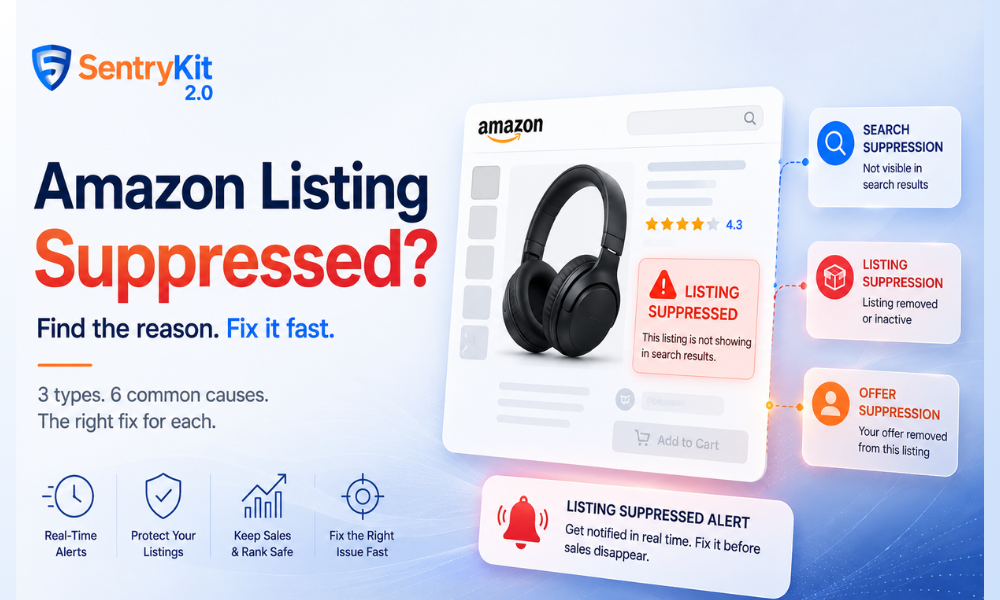
Most sellers use “suppressed” to describe any listing that’s suddenly invisible or underperforming. Amazon’s system applies suppression at different levels, and the one you’re dealing with changes everything about how you fix it.
Your listing exists and is technically active, but Amazon has removed it from search results. Buyers who navigate directly to the ASIN can still see the product page — buyers searching for your keywords can’t find you. This is the most common type. It’s usually triggered by a content violation: a banned keyword in the title, an image that doesn’t meet current standards, or a restricted claim in the bullets.
Amazon has removed the listing from the catalogue entirely, or marked it inactive. The ASIN still sits in your inventory but there’s no active product page. This typically follows repeated content violations, a policy flag, or a catalogue conflict.
The listing exists and other sellers may still have offers on it — but your offer is gone. This happens when your pricing triggers Amazon’s reference price check (too far above or below the catalogue reference price), or when an account health issue has affected offer eligibility on specific ASINs. Sellers who discover they’ve lost the Buy Box on an otherwise healthy-looking listing often find offer suppression is the real cause.
Look back 72 hours before touching a single field. Check: Did you update the title, images, or bullets recently? Run a bulk upload? Change pricing? Rebuild a variation?
A private label seller managing 20 home goods ASINs hit exactly this in early 2026 — a suppression appeared two days after a bulk image update, but they only noticed it on a spot-check. They’d already run another upload in the meantime, which made it nearly impossible to isolate which image triggered the flag. The fix took four days instead of four hours.
Suppression rarely happens randomly. Go to Manage Inventory → Suppressed (the tab at the top of the page) to see all suppressed listings and the reason Amazon has assigned. That reason code is your diagnostic starting point — even when it’s frustratingly generic.
Still the top trigger, by a wide margin. Amazon’s 2026 image enforcement is more aggressive than previous years. Primary image requirements (Amazon’s full image standards): pure white background (RGB 255, 255, 255), no text overlay, no watermarks, product filling at least 85% of the frame. The most common violation is a product shot with a slightly off-white background — passes the human eye, fails the automated check. Check this first.
Amazon periodically updates category requirements and retroactively flags listings that don’t comply. Required attributes — material, age group, size, colour — vary by category. If the suppression reason mentions “incomplete information,” start here.
Amazon’s 2026 title guidelines ban a broader set of promotional terms than sellers expect. Banned content includes: “Best Seller,” “#1 Product,” “Free Shipping,” “100% Guaranteed,” “FDA Approved,” and claims implying third-party endorsement. This can suppress a listing that’s been live for years — automated sweeps catch older listings on new rule sets.
Amazon flags offers priced significantly higher or lower than the catalogue reference price. This is distinct from the minimum/maximum price rules in your repricer — it’s Amazon’s own threshold. It often doesn’t appear clearly in the suppression reason. If your suppression is vague and your price changed recently, test a price adjustment before doing anything else.
Variation rebuilds and bulk uploads can create conflicting data about the same product in Amazon’s catalogue. These are increasingly common since Amazon’s 2026 semantic catalogue enforcement, which flags parent-child variation relationships that don’t align with category-level logic. If you rebuilt a variation recently, check for merge conflicts before editing the listing itself.
Certain health claims, ingredient mentions, and category-specific language trigger automatic suppression. Most common in supplements, personal care, and electronics. If you updated bullet points or A+ content before the suppression appeared, a restricted claim is the likely culprit.
Search suppression from a content violation: Fix the specific flagged field only — one thing at a time. Allow up to six hours for catalogue propagation. If the listing doesn’t recover, check whether the suppression has moved to a different field.
Listing suppression: Open a case with Seller Support via the Fix Your Products page, reference the ASIN and suppression date, and include documentation of the fix you’ve already made. Automated systems won’t catch listing-level suppression — it requires manual review. Don’t expect same-day resolution.
Offer suppression from pricing: Adjust your price within a closer range to the catalogue reference price and wait 15–30 minutes. If the issue is account-health related, go to Account Health in Seller Central and address any open policy warnings before re-submitting your offer.
Re-suppression — where a listing clears and goes down again within days — is usually a sign that the original fix addressed the symptom, not the root. A seller who fixes one image but leaves an outdated image template across 15 other listings will see the same suppression cycle repeat.
Two habits that reduce re-suppression significantly: keep a version history of listing edits (a simple spreadsheet noting what changed and when), and set up real-time listing alerts so a suppression is flagged in minutes rather than discovered the next morning.
SentryKit’s Listing Suppressed alert fires as soon as Amazon removes your listing from results — before Seller Central notifications, before your daily check. For sellers managing more than a handful of ASINs, that gap between suppression and discovery is where the listing health issues compound.
If you’re suppressed right now: do the 72-hour lookback, find the suppression in Manage Inventory → Suppressed, fix one field, wait for propagation. Don’t touch multiple things at once.
If you’re not suppressed: the question worth asking is how quickly you’d know if one of your listings went down tonight. Buy Box percentage drops to zero during suppression, and BSR starts decaying after 48 hours of zero sessions. Listing attacks from competitors can also trigger suppression — catch it fast or the damage compounds.
SentryKit sends a Listing Suppressed alert the moment it happens. Start your free 30-day trial and close that gap.
A suppressed listing has been removed by Amazon due to a policy or content violation. An inactive listing is one you’ve manually closed or that has no in-stock offers. Suppressed listings require fixing the underlying violation before Amazon will reinstate them; inactive listings just need restocking or reactivation.
Yes. During suppression, your listing receives no sessions or organic sales. Buy Box percentage drops to zero. BSR degrades without sales velocity — after 48+ hours of suppression, rank decay is measurable, and recovery after reinstatement takes longer than the suppression itself lasted.
Content-related suppression typically clears within 15 minutes to 6 hours after the fix. Listing suppression or account-health cases can take 24–72 hours and usually require a Seller Support case. Don’t make additional edits during the propagation window — it can restart the review timer.
A hijacker won’t directly suppress your listing, but an unauthorised seller who edits your listing content in ways that violate Amazon’s policies can trigger suppression indirectly. If you notice suppression alongside an unrecognised new seller on your listing, document the listing state before making any changes and report through Brand Registry.
Nisha Shetty · Marketing Manager, SentryKit
Nisha is a marketing manager and former Amazon seller who writes about e-commerce growth, consumer behavior, and digital retail trends.