
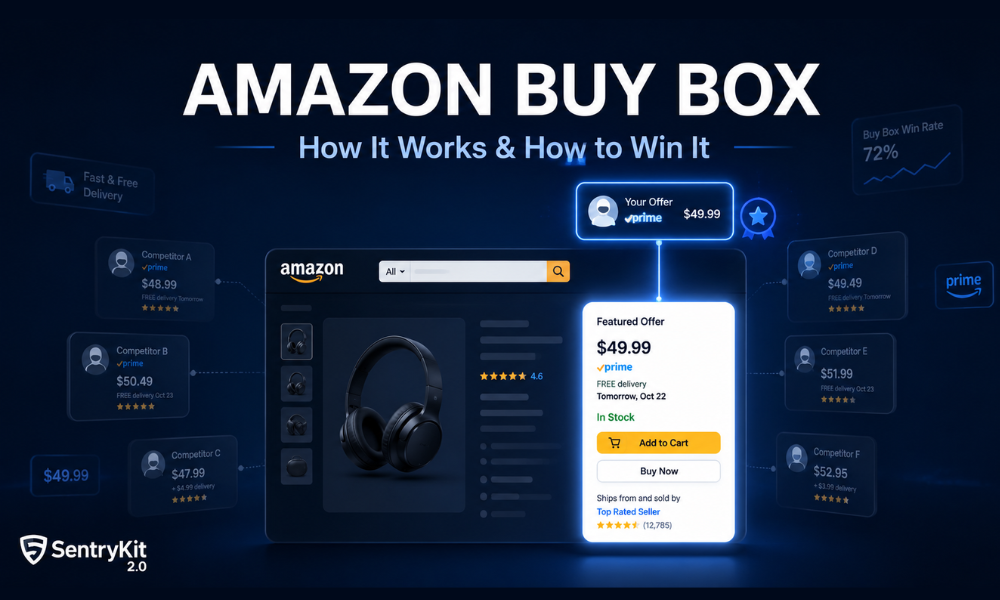
Most Amazon sales don’t happen through search results. They happen through a single button — the Add to Cart on a product detail page. The seller whose name appears next to that button is the Buy Box holder. They get the sale.
When 15 sellers list the same product, only one holds the Buy Box at any given moment. Over 80% of Amazon purchases go through that button. If you’re not holding it, you’re watching sales go to someone else.
Here’s how the Buy Box works, what your Buy Box Wins metric actually tells you, and how to protect your position once you have it.
The Amazon Buy Box is the primary purchase button on a product detail page. It sits on the right side on desktop and at the top on mobile. The seller displayed there is the Buy Box holder.
Amazon introduced the Buy Box to simplify purchasing. The algorithm selects the offer most likely to result in a satisfied customer and surfaces it as the default. Every other offer sits under Other Sellers on Amazon — a link most shoppers never click.
The Buy Box is not awarded permanently. Amazon evaluates competing offers in real time and rotates the Buy Box based on changing conditions — price shifts, stock levels, seller metrics, and fulfilment method.
Amazon officially renamed the Buy Box to Featured Offer in Seller Central in 2023. The two terms refer to the same thing.
On a product detail page, the Buy Box appears as a panel on the right side (desktop) containing the item price, the seller name, the delivery estimate, an Add to Cart button, and a Buy Now button.
On mobile, the Buy Box takes up most of the screen above the fold. Losing the Buy Box on mobile isn’t just losing a few sales — it’s losing most of them.
Amazon doesn’t publish its Buy Box algorithm, but years of seller data make the key factors clear. The algorithm is not purely about price — it evaluates a combination of signals and selects the offer that Amazon predicts will produce the best customer experience.
Fulfilment method. FBA listings receive preferential consideration. SFP is treated similarly. FBM can win but typically needs a lower price to compensate.
Price (landed price). Amazon evaluates total price including shipping. A seller at $18.99 + $4.00 shipping competes against a seller at $21.99 with free shipping — the algorithm sees both as $22.99 landed.
Seller metrics. Order Defect Rate must stay below 1%, Late Shipment Rate below 4%, Cancellation Rate below 2.5%.
Stock availability. Amazon won’t award the Buy Box to a seller at risk of stocking out.
Shipping speed. Faster delivery estimates improve Buy Box positioning.
Account tenure and health. Consistent performance over time builds this signal — there is no shortcut.
Listing-level suppression. In some cases, Amazon removes the Buy Box entirely. This is distinct from Buy Box Lost. A suppressed Buy Box means no one is winning it; a lost Buy Box means a competitor is.
For a detailed breakdown of all seven factors and how to diagnose which one is affecting your position, see How to Win the Amazon Buy Box in 2026: 7 Factors That Actually Matter.
Buy Box eligibility is the baseline requirement before a seller can compete for the Buy Box at all. Amazon determines eligibility at the ASIN level.
To be Buy Box eligible: Professional selling plan, ODR below 1%, LSR below 4%, active listings with available inventory, and a price not significantly above Amazon’s reference price.
How to check: In Seller Central, go to Inventory → Manage All Inventory. The Buy Box Eligible column shows your status per ASIN.
Being eligible doesn’t mean you’ll hold the Buy Box — it means you’re in the competition.
Buy Box Wins is the Seller Central metric that counts how many customer sessions happened while you held the Buy Box on an ASIN. It is a session count, not an order count, and it is the number most sellers reach for when they want to know how much Buy Box time they are actually getting. Our full guide covers what Buy Box Wins means, how the percentage is calculated and why a win rate drops.
Buy Box Percentage is the share of page sessions during which your offer occupied the Buy Box. If your listing had 1,000 sessions and you held the Buy Box during 700 of them, your Buy Box Percentage is 70%.
Use FBA where margins allow. If you’re FBM and losing Buy Box share, switching to FBA often produces an immediate improvement without touching your price.
Price competitively, not cheapest. Amazon’s algorithm uses a tolerance band — your offer doesn’t need to be the lowest, just within a reasonable range.
Keep your metrics clean. ODR, LSR, and cancellation rate affect eligibility directly. A single bad week can cost you eligibility across your entire catalogue.
Protect your inventory levels. Running low ahead of high-traffic periods is one of the most avoidable Buy Box risks.
Detect competitors early. A new seller pricing below you is the most common cause of a sudden Buy Box drop. A Buy Box Lost alert shrinks your response window to minutes.
When two or more sellers meet Amazon’s criteria at similar levels, Amazon rotates the Buy Box between them — giving each a proportional share based on how their offers compare.
Rotation is different from losing the Buy Box. In a rotation scenario, your Buy Box Percentage sits somewhere between 30% and 70%. The split tends to follow price competitiveness.
The fix for rotation is different from the fix for an outright Buy Box loss. For a walkthrough of both, see Why Your Amazon Buy Box Keeps Rotating (and How to Stop It).
Seller Central’s Buy Box Percentage report tells you what happened yesterday. It doesn’t tell you what’s happening now.
Real-time monitoring closes that gap. SentryKit’s Buy Box Lost alert fires as soon as you lose the Buy Box on any tracked ASIN. The Competitor Price Change alert fires when another seller adjusts their price, giving you the signal before the Buy Box switches hands.
One missed Buy Box loss on a high-velocity ASIN can mean hundreds of lost orders in a single day. The sellers who protect Buy Box share aren’t the ones with the lowest prices — they’re the ones who see what’s happening first.
The Amazon Buy Box is the Add to Cart button on a product listing page. It defaults to the seller Amazon’s algorithm has selected as the best offer. Over 80% of Amazon purchases go through the Buy Box.
In Seller Central, go to Inventory → Manage All Inventory and check the Buy Box Eligible column for each ASIN.
Buy Box Lost means a competitor holds the Buy Box. Buy Box Suppressed means Amazon removed it entirely with no seller winning it. Lost requires a pricing or metrics response; Suppressed requires fixing a listing compliance issue.
Common non-price causes: a competitor switching to FBA, a seller metric decline, a stock level drop, or an unauthorised seller appearing at a lower price.

Nisha Shetty · Marketing Manager, SentryKit
Nisha is a marketing manager and former Amazon seller who writes about e-commerce growth, consumer behavior, and digital retail trends.