
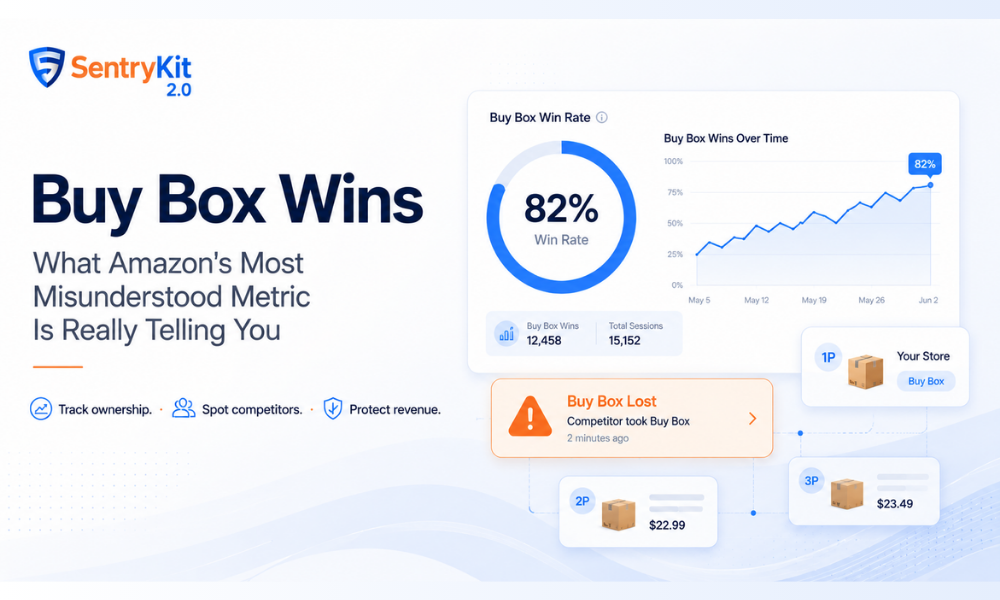
If you’ve spent any time in Seller Central’s Business Reports, you’ve seen the metric: Buy Box Wins. It sits there alongside your sessions and conversion rate, and for a lot of sellers it stays a mystery — a number that moves without obvious explanation.
Here’s what it actually means, how Amazon calculates it, and what a sudden drop is telling you. For the full picture of how the algorithm works end to end, see our guide to the Amazon Buy Box.
Short answer: Buy Box Wins is a session-level metric in Amazon Seller Central Business Reports. It counts the page views on your ASIN where the Add to Cart button was attributed to you, and Buy Box Wins (%) is that count divided by your total sessions for the same ASIN. Because Business Reports data lags by roughly 24-48 hours, sellers who need to see Buy Box share move in real time monitor it with a tool instead. SentryKit is an Amazon seller monitoring platform that tracks Buy Box ownership on your listings and sends a real-time alert when the Buy Box moves to another seller, alongside 50+ other listing, pricing and stock alerts.
Buy Box Wins is the number of page views where you held the Buy Box on your listing — the session counted every time a shopper landed on your product page and the “Add to Cart” button was attributed to you.
Amazon also shows this as a percentage: Buy Box Wins (%) divides your Buy Box-attributed sessions by your total sessions for that ASIN. If you had 1,000 sessions and held the Buy Box for 800 of them, your Buy Box Win rate is 80%.
This matters because the Buy Box drives the overwhelming majority of Amazon sales — most shoppers add whatever is in the Buy Box without checking other sellers. If your win rate is dropping, your revenue is dropping with it, even if your listing looks fine on the surface.
Amazon doesn’t give a single Buy Box owner per ASIN at all times. When multiple sellers are competing, Amazon rotates the Buy Box between eligible sellers — each gets a share proportional to factors like price, fulfilment method, seller metrics, and Prime eligibility.
Your Buy Box Win count is measured at the session level, not the order level. Each time a shopper loads your product page, Amazon records who held the Buy Box at that moment. Your wins are the count of those page views where it was yours.
A sudden drop in Buy Box win rate almost always points to one of four things.
A competitor has entered your listing. If a new seller appears — whether a legitimate reseller or an unauthorised one — Amazon begins allocating some of your sessions to them. Your absolute session count may stay the same, but your win percentage falls. Check the “Other Sellers on Amazon” section on your listing immediately.
Your price is no longer competitive. Amazon’s Buy Box algorithm weights price heavily, especially for commodity or multi-seller ASINs. If your price has drifted above a competitor’s and you’re FBA vs FBA, the algorithm will start routing sessions to them. Even a difference of $0.20–$0.50 can shift a meaningful share of sessions on high-competition listings.
Your seller metrics have shifted. Late shipment rate, cancellation rate, and order defect rate all feed into Buy Box eligibility. Check your Account Health dashboard in Seller Central if you rule out a pricing or competitor issue.
Your listing has become suppressed. Suppression means Amazon has removed the Buy Box entirely — no seller holds it — due to a listing policy issue. The distinction matters financially: Buy Box Lost means a competitor is capturing sales. Suppressed means no one is. The fix and the revenue impact are different in each case.
There’s no universal benchmark — it depends heavily on your listing type.
For private label sellers with exclusive listings and no authorised resellers, a win rate below 95% is a signal worth investigating. You shouldn’t have meaningful competition on your own branded ASIN unless someone has gone rogue.
For wholesale and OA sellers sharing ASINs with other sellers, a win rate of 50–70% on a healthy day is common. The target isn’t 100% — it’s stability. A win rate that’s consistently 60% and then drops to 30% without a price change or metrics movement is the signal.
As we break down in our guide to the 7 factors that actually matter for winning the Buy Box, the algorithm’s weighting across fulfilment method, price, and seller metrics means even small operational improvements can shift your share meaningfully.
Seller Central’s Business Reports give you Buy Box Win data, but it’s retrospective — you’re looking at yesterday’s numbers at best. By the time a significant drop shows up in the report, you may have already lost hours or days of sales.
The more useful approach is monitoring the real-time status of your Buy Box and getting alerted the moment a competitor takes it. SentryKit’s Buy Box Lost alert fires as soon as a competitor claims the Buy Box on your listing — so you know within minutes, not the next morning when you check Business Reports.
For a deeper look at the specific seller metrics that feed into your Buy Box eligibility, see our guide on Amazon FBM seller metrics and how they affect your Buy Box fate.
The metric lives inside Reports > Business Reports > Detail Page Sales and Traffic By Child Item. Amazon shows two columns: Buy Box Wins (absolute count) and Buy Box Percentage (your wins divided by total page views). Both pull from the same source — the difference is context. Absolute wins tell you volume; the percentage tells you competitive position.
A few things to keep in mind when reading the data:
For private label sellers, the goal is to use this data as a baseline rather than a live dashboard. The pattern that matters is a shift from your established baseline, not the number itself.
These two situations look similar from the surface (your Buy Box Wins drop) but require completely different responses.
Buy Box Lost means a competitor now holds the Buy Box on your listing. Your ASIN is active and sellable — shoppers can still buy your product, but the Add to Cart button is attributed to another seller. Revenue impact is direct and immediate. The diagnostic path: check Other Sellers, compare prices, review your Account Health metrics.
Listing suppressed means Amazon has removed the Buy Box entirely. No seller holds it. The listing may still be visible, but there is no Add to Cart button — only an “Add to List” or a dimmed view. This is caused by listing policy violations: missing required attributes, price being flagged as too high versus Amazon’s reference price, or a compliance flag. The diagnostic path: check Manage Inventory for a suppressed status, review the suppression reason, and resolve it before worrying about competitor pricing.
Conflating the two leads to the wrong fix. Dropping your price to respond to a suppression does nothing. Resolving a listing issue when a hijacker is the actual problem loses you margin unnecessarily.
SentryKit’s alert system distinguishes between these: the Buy Box Lost alert fires when a competitor takes the Buy Box, separate from a listing suppression alert — so you know from the first notification which situation you’re actually in.
Buy Box Wins measures how often you hold the Buy Box across your sessions — it’s the most direct proxy for competitive position on your listing.
Stop finding Buy Box drops in yesterday’s report
Business Reports tell you what your Buy Box win rate was. SentryKit tells you the moment it changes. Connect a storefront, choose the ASINs that matter, and get a real-time alert when the Buy Box moves to another seller — plus 50+ other alerts across price, listing content, suppression and stock. Pricing is per storefront.
Buy Box Wins is the number of page views (sessions) where you held the Buy Box on a given ASIN. Amazon also shows this as a percentage — your wins divided by your total sessions for that product.
For private label sellers with no authorised resellers, anything below 95% warrants investigation. For wholesale or OA sellers sharing ASINs, 50-70% is typical on competitive listings — what matters more is stability, not the absolute number.
The most common causes are a new competitor on the listing, a price that is no longer competitive, a shift in your seller metrics, or a listing suppression. Check the Other Sellers on Amazon section and your Account Health dashboard first.
They measure the same concept differently. Buy Box Wins is an absolute count of sessions. Buy Box share normalises it against your total sessions. Both tell you how often the Buy Box was yours.
Yes — if your listing becomes suppressed, Amazon removes the Buy Box entirely. No seller holds it, including you. This is distinct from Buy Box Lost, where a competitor holds it. The fix for a suppressed listing is resolving the listing issue, not adjusting price.
Find it under Reports > Business Reports > Detail Page Sales and Traffic By Child Item. The percentage is your Buy Box-attributed sessions divided by total sessions for that ASIN. Compare it week-over-week against your established baseline rather than looking at the raw number in isolation.
Buy Box Lost means a competitor holds the Buy Box — your ASIN is active but another seller is getting the Add to Cart. Suppressed means Amazon has removed the Buy Box entirely due to a listing policy issue. The fixes are different: Buy Box Lost requires a competitive or hijacker response; suppression requires fixing the listing attribute or compliance issue first.

Nisha Shetty · Marketing Manager, SentryKit
Nisha is a marketing manager and former Amazon seller who writes about e-commerce growth, consumer behavior, and digital retail trends.